On this page
Choosing between webhooks, polling and Action Scheduler in WordPress depends on how information moves between applications, when processing must happen and how the system handles failures.
A payment may succeed externally while WordPress still displays a Pending status. A CRM integration may fail after a customer submits a form. A background task may stop before completing an important operation.
These situations require more than a working API connection. They require an architecture that preserves accurate information and recovers safely when communication fails.
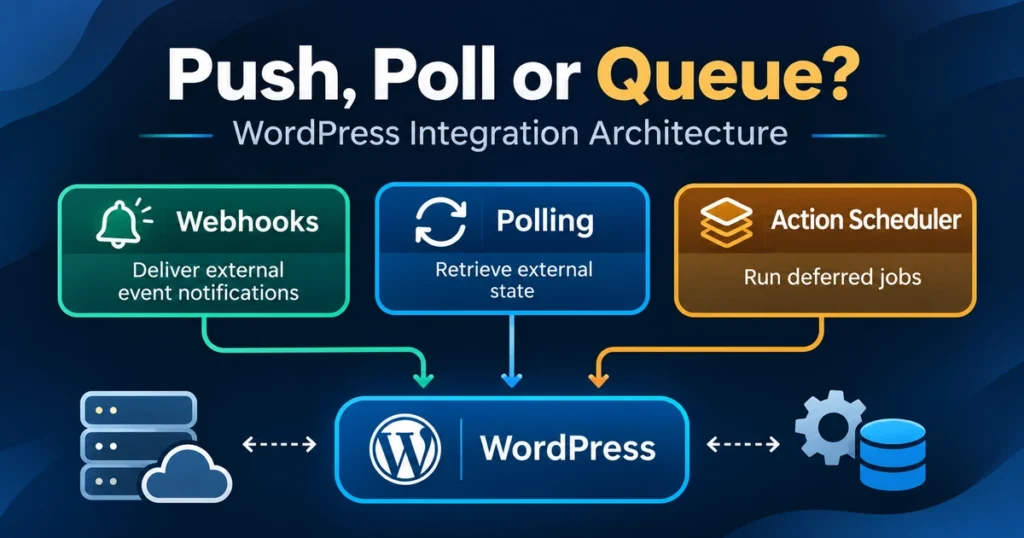
The fundamental differences are:
- Webhooks: Receive notifications when something changes in an external application.
- Polling: Request the latest information from an external application.
- Action Scheduler: Execute background tasks independently of the original user request.
This guide explains when to use each mechanism, how to combine them and what to evaluate before deploying a production WordPress integration.
1. Start with the integration requirement
The right integration pattern depends on data ownership, response requirements and the consequences of a failed operation.
Before selecting a mechanism, establish:
- Data ownership: Which application maintains the authoritative information?
- Response requirements: Does the user need an immediate result?
- Recovery requirements: What happens when communication fails?
- Processing requirements: Can the operation continue in the background?
- Business impact: Could incorrect or duplicate processing affect customers?
These questions help determine whether the integration needs event notifications, periodic verification or background execution.
When a webhook should carry the event
A webhook allows an external application to notify WordPress when a relevant event occurs.
Instead of continuously checking for changes, WordPress receives information when the external application sends a notification.
Webhooks are suitable for:
- Payment confirmations.
- Subscription status changes.
- CRM contact updates.
- External document processing completion.
- Transactional event notifications.
A reliable webhook handler should verify the sender, validate the received information and associate it with the correct local record.
Accepted events should be stored reliably before acknowledging successful delivery.
The limitation is that webhook delivery can fail. Duplicate notifications and unexpected event ordering must also be considered.
When polling is the safer authority
Polling retrieves information directly from an external application using its API.
It is particularly useful when the external system maintains an authoritative status that WordPress needs to verify.
Common examples include:
- Checking whether a pending payment succeeded.
- Recovering information from missed webhooks.
- Monitoring external document processing.
- Synchronising records from applications without webhook support.
- Verifying whether previously received information remains accurate.
Polling requires appropriate request intervals, response timeouts and stopping conditions.
The objective is to retrieve useful information without creating unnecessary traffic or exceeding API rate limits.
When Action Scheduler should own background work
Action Scheduler is a WordPress background processing library that supports asynchronous, delayed and recurring tasks.
It is useful when work does not need to finish during the original browser request.
For example, a website can save a completed application form immediately and process CRM synchronisation separately. A temporary CRM outage would not need to interrupt the initial submission.
Suitable background operations include:
- Synchronising records with external applications.
- Sending transactional notifications.
- Scheduling payment status checks.
- Processing batches of records.
- Retrying temporarily unsuccessful API requests.
Action Scheduler manages execution. The application still needs to determine whether the operation produced the intended business outcome. Capability Webhooks Polling Action Scheduler Receive external events Yes No No Retrieve current external status Not directly Yes Through scheduled API requests Execute deferred work Requires additional handling Requires an execution mechanism Yes Recover missed events Limited Yes, where supported Can schedule recovery Primary dependency External event delivery External status API Background queue execution Main responsibility Event delivery State verification Task execution
These mechanisms are complementary. A reliable application can use webhooks for notifications, polling for verification and Action Scheduler for background processing.
2. Map payment confirmation to the right mechanism
Payment processing demonstrates why event delivery and business outcomes must remain separate.
A customer can complete a payment while the originating website is still waiting for confirmation. Incorrectly treating that delay as a failure could encourage another payment attempt.
The architecture must preserve uncertainty until the actual transaction outcome can be verified.
Separate event delivery from final state
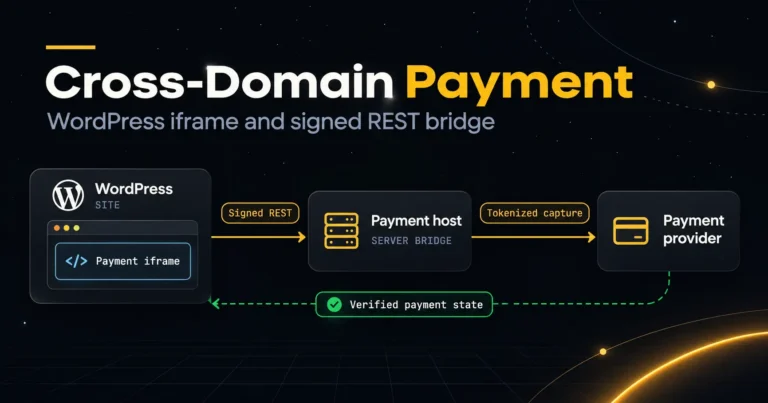
3 payment providers share a common status model in my published cross-domain payment proxy architecture.
The implementation uses signed server-to-server communication, callback verification, duplicate processing guards and status polling.
The important architectural decision is that receiving information does not automatically authorise a business state change.
Each confirmation must be validated before updating the corresponding transaction.
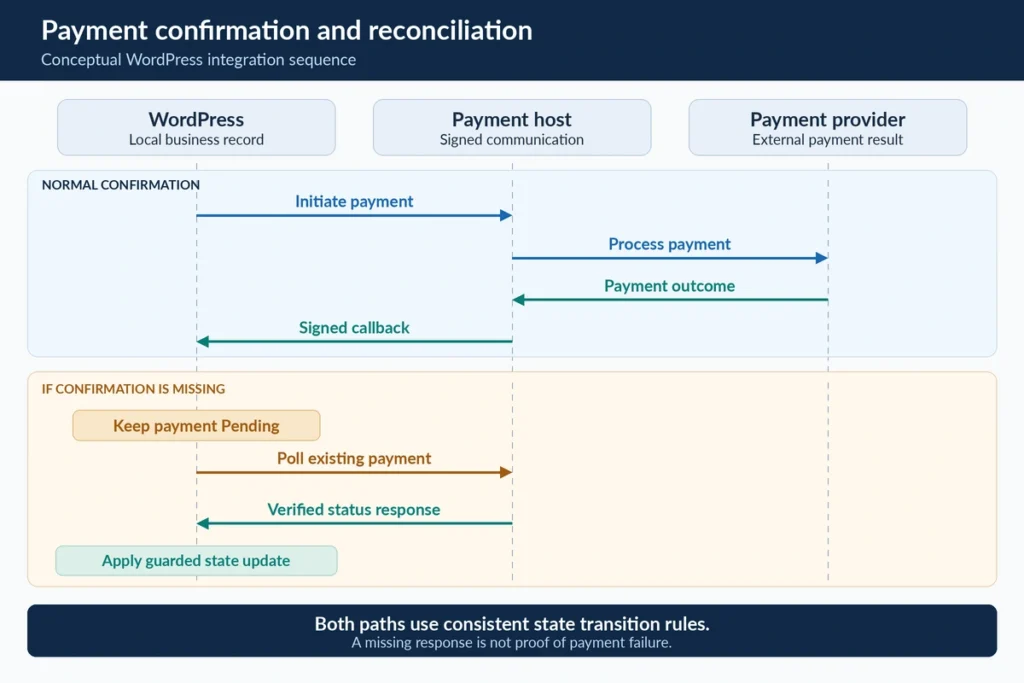
- WordPress creates a local payment record.
- The payment host coordinates external payment processing.
- A signed callback communicates the outcome.
- WordPress validates the information before updating its record.
- If confirmation is missing, status polling retrieves the existing transaction outcome.
- Consistent state transition rules determine the resulting local status.
Both confirmation paths must agree on how the payment record can change.
This prevents callback handling and status reconciliation from independently triggering conflicting business operations.
Handle late acknowledgements without guessing
A request timeout does not establish whether a payment succeeded or failed. It only establishes that the application did not receive the expected response within its configured waiting period.
A reliable integration must distinguish a confirmed failure from an unknown outcome. Payment state Meaning Appropriate action Processing Payment workflow has started Await confirmation Pending Outcome cannot yet be confirmed Verify the existing transaction Paid Successful payment has been verified Permit fulfilment Failed Payment failure has been confirmed Follow the approved recovery process
This simplified model represents an individual payment attempt.
Refunds, disputes and subsequent payment attempts require additional lifecycle rules.
For website owners, this distinction matters because communication problems should not automatically produce incorrect order statuses or unnecessary payment attempts.
Use reconciliation for the Pending state
Payment webhook reconciliation resolves transactions that remain uncertain after the expected confirmation period.
A reconciliation process should:
- Identify unresolved transactions.
- Retrieve their current external status.
- Validate the returned information.
- Apply permitted state changes.
- Record unsuccessful verification attempts.
- Escalate transactions that remain unresolved beyond the defined recovery window.
If the external system remains unavailable, WordPress should preserve the last verified information.
Action Scheduler could execute these reconciliation tasks in a different WordPress implementation. It is presented here as an architectural option, not as a component of the published payment case study.
3. Design retries, idempotency and visibility
A reliable WordPress integration must account for repeated events, unavailable dependencies and interrupted processing.
The implementation needs explicit rules for deciding whether work can be repeated safely.
Prevent duplicate side effects
Idempotency means that repeating an operation does not introduce additional unintended business effects.
For example, receiving the same payment confirmation repeatedly should not trigger repeated order fulfilment or duplicate receipts.
A reliable implementation separates event identity from business operation identity. Protection Purpose Event identifier Recognise repeated notifications Transaction reference Locate the corresponding business record State transition guard Prevent invalid status changes Business operation identifier Prevent repeated downstream operations Database constraints Protect against concurrent processing
Simply checking whether a record exists before inserting it may not be sufficient.
Multiple PHP requests can execute simultaneously. Without appropriate database protections, separate workers could process the same operation. See how these decisions apply to a real payment architecture Explore the communication boundaries, payment confirmation process and recovery decisions documented in my cross-domain payment implementation.
Database uniqueness constraints, atomic updates and suitable transaction boundaries help prevent these conflicts.
External operations may also require provider supported idempotency keys. Local duplicate protection alone cannot establish whether an external operation succeeded after its acknowledgement was lost.
Add retry limits and backoff
5 retries with progressively longer delays represent an illustrative recovery policy for a temporary external API failure.
This approach gives an unavailable dependency time to recover while limiting unnecessary requests. Retry attempt Example waiting period Retry 1 1 minute Retry 2 2 minutes Retry 3 4 minutes Retry 4 8 minutes Retry 5 16 minutes Limit reached Escalate for investigation
These intervals are example settings, not measured production figures. Actual retry policies should follow provider requirements and operational priorities.
Temporary failures that may justify retries include:
- Network connection errors.
- External server errors.
- Temporary API rate limits.
- Interrupted background execution.
Invalid credentials, unsupported requests and permanent validation failures generally require investigation instead of repeated execution.
Action Scheduler retries should be implemented explicitly. Developers should not assume that every failed scheduled action will automatically run again.
The Action Scheduler API provides functions such as as_schedule_single_action() for scheduling another attempt when appropriate.
Adding a small random variation to retry delays can also reduce simultaneous requests during widespread failures.
Log enough to diagnose a failure
Technical logging should help administrators understand what happened without exposing sensitive information.
Useful diagnostic information includes:
- Correlation reference: Connect related integration operations.
- Event type: Identify the activity being processed.
- Processing status: Distinguish completed and unsuccessful execution.
- Previous and current state: Explain changes to business records.
- Attempt count: Identify repeated execution.
- Error category: Distinguish temporary and permanent failures.
- Next attempt: Show when recovery is expected.
Logs should exclude API credentials, unnecessary personal information, payment details and sensitive request contents.
The Scheduled Actions administration screen provides visibility into scheduled work and execution errors.
However, administrators also need visibility into unresolved business records. A completed background task does not necessarily mean that the intended external operation succeeded.
4. Compare failure paths
Architecture decisions become easier to evaluate when expected failure conditions are documented before implementation.
The system should establish what information remains reliable, what requires verification and how interrupted operations can recover.
Missed webhook
A webhook can fail to reach WordPress because of application downtime, network interruptions or request processing errors.
Without reconciliation, the local business record may remain outdated.
The appropriate recovery approach is to identify unresolved records and request their current status from the authoritative system.
If the original webhook arrives later, duplicate protection and state transition rules should prevent unnecessary processing.
Slow status endpoint
Polling becomes problematic when slow external responses block important website operations.
An integration should define:
- Connection and response timeouts.
- Appropriate polling intervals.
- Concurrent request limits.
- Retry and escalation conditions.
When immediate verification is unnecessary, polling can run through background execution.
An unsuccessful status request should not overwrite previously verified business information.
Failed scheduled action
A scheduled task can fail because of an external API error, expired credentials, unexpected data or interrupted PHP execution.
Action Scheduler provides execution visibility, but the application still needs a recovery strategy.
Background execution also depends on a functioning queue runner. Default scheduling may be delayed when WordPress traffic or background request execution is insufficient.
Where hosting permits, system scheduling or WP CLI can provide alternative execution mechanisms.
The WordPress Cron documentation explains the timing limitations of ordinary WordPress scheduled tasks.
Integration failure matrix
| Failure scenario | Expected behaviour | Recovery mechanism |
|---|---|---|
| Missed webhook | Preserve unresolved state | Poll the external status |
| Duplicate webhook | Prevent repeated side effects | Idempotency controls |
| Invalid signature | Reject untrusted information | Investigate authentication |
| Payment timeout | Preserve Pending status | Verify existing transaction |
| Slow external API | Avoid blocking unrelated operations | Background processing |
| API rate limit | Defer additional requests | Backoff and provider guidance |
| Outdated event | Prevent invalid state changes | Verify authoritative information |
| Failed scheduled action | Record execution failure | Controlled retry or escalation |
| Queue execution interrupted | Preserve outstanding work | Restore processing |
| Retry limit reached | Flag unresolved operation | Authorised manual review |
A failure matrix helps developers and managers agree on expected behaviour before problems occur.
It also gives administrators a practical reference when investigating unexpected integration results.
5. Choose the pattern for your integration
WordPress async integration patterns should be selected for individual operations rather than entire applications.
A single website can use different mechanisms for payment processing, CRM synchronisation, notifications and business workflows.
Classify your endpoints with the decision table
Use this table to identify the appropriate mechanism for each integration requirement. Integration requirement Primary mechanism Supporting mechanism Receive payment confirmation Webhook Status reconciliation Verify a pending payment Polling Scheduled execution Receive CRM updates Webhook, where supported Periodic reconciliation Import external records Polling Action Scheduler Send transactional notifications Action Scheduler Delivery tracking Monitor document processing Webhook or polling Background execution Process large record batches Action Scheduler Progress checkpoints Recover missed external updates Polling Scheduled execution Calculate an immediate delivery price Synchronous API request Timeout handling
Not every integration needs asynchronous processing.
When a customer requires an immediate delivery estimate or pricing calculation, a controlled synchronous API request may be more appropriate.
Background processing is most valuable when the operation can continue independently without preventing the user from completing their current task.
Add a recovery path before production
Use this implementation review checklist when evaluating a custom WordPress plugin, external API connection or PHP integration.
- Data ownership: Identify which application maintains authoritative information.
- State management: Define valid business state transitions.
- Authentication: Verify incoming requests before accepting information.
- Replay protection: Reject unauthorised or outdated repeated requests where supported by the communication contract.
- Durable processing: Preserve accepted work before acknowledging receipt.
- Duplicate protection: Prevent repeated business operations.
- Recovery: Define how missing notifications are reconciled.
- Retry policy: Separate temporary failures from permanent errors.
- Queue monitoring: Detect failed or delayed background execution.
- Operational visibility: Identify unresolved business records.
- Access control: Restrict manual recovery actions and sensitive logs.
- Testing: Verify recovery after interrupted processing.
What should be tested before deployment?
| Test scenario | Expected result |
|---|---|
| Deliver the same event repeatedly | No duplicate business operation |
| Deliver conflicting events out of order | Only permitted state transitions occur |
| Interrupt processing after accepting an event | Outstanding work remains recoverable |
| Make the external API temporarily unavailable | Controlled recovery without data corruption |
| Remove the expected webhook confirmation | Reconciliation identifies the actual status |
| Stop background queue execution | Outstanding work remains visible |
| Submit an invalid signed request | The request is rejected |
The objective is not simply to confirm that the integration works during normal operation.
The implementation should remain understandable and recoverable when communication, external dependencies or background processing fail.
6. Conclusion
Webhooks, polling and Action Scheduler serve different responsibilities within WordPress integration architecture.
Webhooks communicate external events. Polling verifies external information, while Action Scheduler executes deferred work.
The right combination depends on business requirements, data ownership and acceptable processing delays.
For website owners and managers, a reliable integration should preserve accurate business information even when external applications become unavailable.
For developers and IT leads, the priority is consistent state management, secure communication, duplicate protection and observable recovery.
These architectural decisions help transform a working API connection into a maintainable production system. Evaluate your WordPress integration architecture Use the decision table in this article to classify your integration paths and identify missing recovery mechanisms. Compare your approach with the published payment architecture or explore additional WordPress and PHP implementations involving operational workflows, security and external API integrations.
Frequently asked questions
What is the difference between webhooks and polling in WordPress?
Webhooks receive notifications when external events occur. Polling requests the current information from an external application at defined intervals or when verification is required.
Webhooks are useful for prompt notifications, while polling supports verification and recovery.
Is Action Scheduler better than WP-Cron?
Action Scheduler is generally more suitable when an application requires individually tracked background tasks, execution history and operational monitoring.
WP-Cron remains appropriate for simpler scheduled operations. The correct choice depends on the application’s processing and recovery requirements.
Can WordPress use webhooks, polling and Action Scheduler together?
Yes. WordPress can receive webhook notifications, use polling to verify unresolved records and execute background operations through Action Scheduler.
Each mechanism should have a clearly defined responsibility.
Does Action Scheduler automatically retry failed tasks?
Developers should not assume that failed actions automatically retry.
The application should implement an appropriate recovery policy that classifies errors, limits attempts and schedules another execution when necessary.
What happens if a payment webhook fails?
WordPress should preserve the last verified payment state and retrieve the existing transaction outcome through an authorised status API.
A missing webhook should not automatically mark the transaction as failed.
How do WordPress integrations prevent duplicate processing?
Integrations can combine event identifiers, transaction references, database constraints and state transition guards.
External operations may also require provider supported idempotency keys to prevent repeated business effects.
Are webhooks always better than polling?
No. Webhooks are effective when an external application supports reliable event notifications.
Polling remains valuable when information requires independent verification, notifications are unavailable or missed events need reconciliation.